
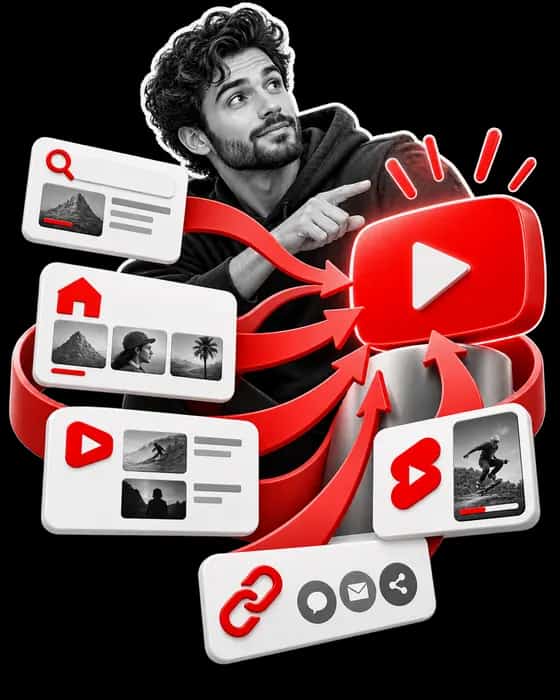
To get more views on YouTube, find the surface that already sends you viewers and improve that one first: YouTube search, Home and Suggested videos, the Shorts feed, or links outside YouTube. The Reach tab in YouTube Studio shows the split for each video. YouTube ranks each surface differently. Its Help pages, read on October 8, 2026, say search weighs "three key elements" (relevance, engagement and quality), Home weighs "How well your video has interested and satisfied similar viewers", and Suggested offers what viewers are "most likely to watch next".
Two things complicate the advice. YouTube says its system "doesn't promote videos to your audience but rather finds videos for your audience when they visit YouTube", and "not all videos are eligible to be recommended". And on October 1, 2026, YouTube said it is updating Shorts recommendations to "reduce the reach of content re-uploaded from other creators without adding anything of your own".
Where YouTube views come from
YouTube views come from traffic sources that YouTube Analytics reports separately. This guide covers five of them: YouTube search, browse features such as Home and Subscriptions, Suggested videos, the Shorts feed, and external sites and apps. To see your own mix, open a video's Analytics in YouTube Studio and choose Reach; the "How viewers find this video" card splits views by source (YouTube Help, Understand your YouTube video reach, read October 8, 2026). The table quotes that page's definition of each source; the Source column names the Help page for what decides it.
| Traffic source | YouTube's definition | What YouTube says decides it | Source |
|---|---|---|---|
| YouTube search | "Traffic from YouTube search results." | Relevance, engagement and quality, plus the viewer's history | Help: How YouTube search works |
| Browse features | "Traffic from the Home, subscriptions, Watch Later, Trending/Explore, and other browsing features." | On Home: how similar viewers responded, and watch history | Help: YouTube performance FAQ |
| Suggested videos | "Traffic from suggestions that appear next to or after other videos, and from links in video descriptions." | The video being watched is "the main signal" | Help: How YouTube recommendations work |
| Shorts | "Traffic from the Shorts vertical viewing experience." | A personalized feed; on October 1, 2026, YouTube said it is updating it to further prioritize original content | Help: How YouTube recommendations work; TeamYouTube, October 1, 2026 |
| External | "Traffic from websites and apps that have your YouTube video embedded or linked to." | Where you and others share or embed it | Help: Promote your videos |
How YouTube decides who sees a video, briefly
YouTube matches videos to viewers from what each viewer watches and how they react. Its Help page How YouTube recommendations work (read October 8, 2026) says the system learns "from over 80 billion pieces of information we call signals", led by watch history, search history, subscriptions, likes, dislikes, "Not interested" and "Don’t recommend channel" feedback, and satisfaction surveys, which help it "understand satisfaction, not just watch time".
YouTube's performance FAQ says its discovery system "uses absolute and relative watch time as signals", and that "relative watch time is more important for short videos and absolute watch time is more important for longer videos." Packaging (the title and thumbnail together), the first 30 seconds and audience retention are covered in our guide to getting more YouTube subscribers, so this guide stays with the surfaces themselves.
How to get more views from YouTube search
YouTube search ranks videos on relevance, engagement and quality, weighted by type of search. YouTube's Help page How YouTube search works (read October 8, 2026) says relevance looks at "how well the title, tags, description, and video content match your search query", engagement includes "the watch time of a particular video for a particular query", and quality means signals of "expertise, authoritativeness, and trustworthiness on a given topic". YouTube "doesn't accept payment for better placement within organic search results".
Two lines in the performance FAQ narrow where effort pays. Search results "are not a list of the most-viewed videos for a given search." And tags are "Not important": they "are primarily used to help correct for common spelling mistakes". YouTube's page on videos missing from search does still suggest you "Improve your video tags to help your video show up in searches", so tags are a small fix, not a lever.
- Give search videos a searchable title. YouTube's Thumbnail & title tips separate "Searchable titles that clearly outline what to expect" from "Intriguing titles" for viewers "who may not be looking for topic-specific content". Pick one per video.
- Use the words viewers use. The same page points to "research insights in YouTube Analytics", and the Reach tab's "YouTube search terms" card shows the terms that already brought viewers to a video.
- Make the description and the video match the title. Relevance covers the description and "video content", not the title alone.
- Allow a few days. YouTube's page on videos missing from search says a new or updated video "may take a few days" to appear in results.
How to get more views from Home and Suggested videos
Home and Suggested are recommendation surfaces: YouTube picks videos for each viewer instead of ranking them for a query. YouTube's performance FAQ (read October 8, 2026) says Home selection rests on "Performance", defined as "How well your video has interested and satisfied similar viewers, among other factors", and on watch and search history. Suggested videos "are often related to the video your audience is watching, but they can also be personalized based on watch history."
The recommendations page adds that "our system uses the video you’re currently watching as the main signal when suggesting a video to play next", while Home "primarily relies on your watch history".
- Link your videos to each other. End screens, video cards and playlists are each a traffic source, and YouTube counts "links in video descriptions" as Suggested traffic. A series on one topic gives every video an obvious next one.
- Judge packaging where it is seen. YouTube's title tips say to check "the click-through rate (CTR) on Home and Suggested in the first 24 hours after publication".
- Test instead of guessing. YouTube Studio's A/B test compares "up to 3 different titles and thumbnails" and shows the one "with the highest watch time" to everyone. It runs on desktop, needs advanced features and excludes Shorts.
- Keep what works. Asked whether a new title or thumbnail re-ranks a video, YouTube answers "Maybe", because its systems respond to how viewers react to the new version "rather than the act of changing the video title or thumbnail", and adds: "don’t change what’s working."
Hype: a leaderboard for smaller channels
Hype lets fans give a new video points toward a leaderboard in YouTube's Explore menu, and it is open to Partner Program channels with 500 to 500,000 subscribers. YouTube's hype leaderboard page (read October 8, 2026) says "The fewer subscribers a creator has, the more bonus points are applied", that you cannot hype your own videos, and that hype runs in listed countries, including the United States, the United Kingdom and India. If your channel qualifies, the window to ask viewers to hype a long-form video is its first 7 days: viewers can hype long-form videos "uploaded within the last 7 days".
How to get more views on YouTube Shorts
Shorts views come from the Shorts Feed, which YouTube says "is personalized to reflect what we think you want to see next", and from search, the homepage, your channel and Subscriptions. YouTube's Reach tab reports a Short's "Stayed to watch" rate, and on October 1, 2026, YouTube said it is updating Shorts recommendations to reduce the reach of re-uploads, so original Shorts that hold viewers past the first seconds are what YouTube's own tools and rules point to.
A Short is a video "up to three minutes in length" with "a square or vertical aspect ratio", for uploads on standard channels since October 15, 2024 (Understand three-minute YouTube Shorts). The places Shorts appear are listed on YouTube's Get started creating YouTube Shorts page, and the Reach tab defines "Stayed to watch" as "The percentage of times viewers stayed to watch past the initial seconds of a Short".
- Post your own material. On October 1, 2026, YouTube said Shorts recommendations are being updated to reduce the reach of content re-uploaded "without adding anything of your own" (see the next section).
- Point Shorts viewers to longer videos. A related video attached in YouTube Studio appears as "a clickable link below your channel handle" (Add a related video to your YouTube Shorts); it needs advanced feature access.
- Do not count on description links. YouTube's page on sharing links says "URLs placed in YouTube Shorts comments and Shorts descriptions are non-clickable."
- Clear Content ID claims on longer Shorts. A Short over one minute "with an active Content ID claim of any type" is "blocked globally on YouTube" and "will not be playable or recommended".
The October 1, 2026 Shorts originality update
On October 1, 2026, YouTube said it is changing Shorts recommendations to favor original content and cut the reach of re-uploads. The post, Prioritizing original content on Shorts, appeared in the YouTube Help Community under a "Blog" label, signed by JJ (TeamYouTube), and was read on October 8, 2026. It says "Channels identified as primarily aggregating or re-uploading other creators’ videos without significant changes will likely see less distribution within the Shorts feed."
The post steers creators away from cosmetic changes. It asks for "your own voice, storytelling, or distinct point of view" rather than "making minor technical edits or template-based changes simply to alter a video", and, where you use someone else's clips, for "original commentary, unique edits, or storytelling". YouTube calls the change "aligned with our existing YouTube policies" and links its Spam Policy, which already bans "Scraped content" and "Detection evasion" such as "speeding up audio, heavy filters, cropping".
| Area | What the October 1, 2026 post says | Source |
|---|---|---|
| Reach of re-uploaded Shorts in the Shorts feed | Recommendations are being updated to reduce the reach of content re-uploaded "without adding anything of your own"; no start date is given | TeamYouTube post |
| How views are counted | Not mentioned. Since August 24, 2026, views count "the moment a video starts to play" | Help: How engagement metrics are counted |
| Monetization | Not mentioned. The existing reused content rule "applies to your channel as a whole", "even if you have permission from the original creator" | Help: channel monetization policies |
| YouTube policies | No new rule announced; the Spam Policy already covers scraped content | Help: Spam Policy |
For the August 24 change and which counts decide earnings, see our article on what counts as a view on YouTube.
How to get views from outside YouTube
External traffic is views from sites and apps that embed or link your video. YouTube's Promote your videos page (read October 8, 2026) tells creators to "Allow embedding so others can distribute for you" and to "Link your YouTube channel in as many places as you can: websites, blogs, magazines." The Reach tab's "External sites or app" card names the sites that sent viewers.
Clickable links in long-form descriptions need your channel's advanced features turned on, and a channel page can show "up to 14 links". Share with care: the Spam Policy treats "Comment spam", such as "identical or similar “check out my channel” messages across hundreds of videos", as a violation.
Where paid views fit, and what YouTube's rules say
Paid views come in two kinds, and YouTube treats them in opposite ways. Views paid for through YouTube Promote, YouTube's own ad tool, are legitimate, according to its Help page; views bought from third-party sellers break YouTube's Terms of Service.
YouTube's own ads: Promote and Google Ads
YouTube Promote is a simplified ad tool on YouTube, "powered by Google Ads". Its Help page, Get started with YouTube Promote (read October 8, 2026), says "Yes, all views and subscribers you gain through a Promote campaign are legitimate", and also "No, promotions don't impact your channel's or a specific video's organic performance."
Ad views count in two different ways. The public view count includes them: they are "counted the moment a video ad starts to play across Shorts and in-stream ads" (How engagement metrics are counted). YouTube Analytics is stricter: its Reach help page says views from skippable ads longer than 10 seconds count "if they're watched for 30 seconds or until they're finished", and "Non-skippable ads never qualify as views in YouTube Analytics." For the YouTube Partner Program (YPP), "Watch hours & subscribers gained through ad campaigns do not count towards YPP eligibility thresholds."
Views bought from third-party sellers
YouTube's US Terms of Service (effective December 15, 2023, read October 8, 2026) bar causing "inaccurate measurements of genuine user engagement with the Service, including by paying people or providing them with incentives to increase a video’s views". Its Fake engagement policy says YouTube "doesn’t allow anything that artificially increases the number of views, likes, comments, or other metrics either by using automatic systems or serving up videos to unsuspecting viewers".
The policy holds the channel responsible even when someone else did the buying: "If you hire someone to promote your channel, their decisions may impact your channel. Any method that violates our policies may result in content removal or a channel takedown, whether it's an action taken by you or someone you've hired."
The Fake engagement policy also says "Page traffic found to be artificial will not be counted on YouTube and can lead to strikes on your account", and YouTube's metrics page adds that it may "discard low-quality playbacks". Channels that break the policy "may be terminated and removed from YouTube", and 3 strikes within 90 days may also end in termination.
If you are researching paid views anyway, our YouTube views ranking compares what each seller publishes about delivery and refills, and HowSociable may earn a commission if you buy through it. Nothing on that page changes the rules above. For how bought and promoted views relate to the Shorts route into the Partner Program, see YouTube Shorts monetization requirements.
What this means if you are growing a channel
Diagnose before you change anything. Use the Reach tab to find the traffic source that already sends you the most views, then work on that surface: searchable titles for search, series and end screens for Suggested, original Shorts with a related video for the Shorts feed. YouTube's own FAQ plays down several habits:
- Upload frequency: "growth in views across uploads is not correlated with time between uploads", although the same FAQ lists "Uploading less frequently than usual" among common reasons for less traffic from Home or Suggested.
- Breaks: YouTube "found no correlation between break length and changes in views".
- Publish time: "not known to impact a video’s long-term performance", except for Live streams and Premieres. Our page on the best time to post on YouTube explains Studio's "When your viewers are on YouTube" report.
- One weak video: "What matters is how viewers reply to each video when it’s recommended to them."
If recommended views are falling, YouTube's FAQ lists the usual reasons, from an audience watching other channels to a topic losing popularity, and advises you to "keep experimenting with new topics and formats".
The short version
- YouTube views come from search, Home and other browse features, Suggested videos, the Shorts feed and external sites; the Reach tab shows your mix.
- Search ranks on relevance, engagement and quality; results "are not a list of the most-viewed videos", and tags are a small fix: YouTube's FAQ calls them "Not important".
- Suggested uses the video being watched as "the main signal"; Home relies mainly on watch history.
- On October 1, 2026, YouTube said it is updating Shorts recommendations to cut the reach of re-uploads that add nothing new; the post announces no change to view counting or monetization.
- Promote views are legitimate but do not affect organic performance, and watch hours from ad campaigns do not count toward Partner Program eligibility; views bought from third parties break YouTube's Terms of Service.
Next, read our guide to growing YouTube subscribers, check what counts as a view on YouTube, or see the YouTube monetization requirements.
Sourcing: YouTube's rules and wording are quoted from 18 YouTube Help Center pages, linked in the sections above, the TeamYouTube Community post of October 1, 2026, and YouTube's US Terms of Service (effective December 15, 2023), all read on October 8, 2026. HowSociable did not run ads, buy views or test any tactic for this article.